AI contract review for small businesses
Understand a contract before you sign it
Upload a contract you’ve been sent. LegalSling explains every clause in plain English, shows what it means for each side, flags terms that may go too far, and turns it all into a brief for your lawyer.
- 500 free credits, no card needed
- UK, EU and US contracts
- Pay as you go, no subscription
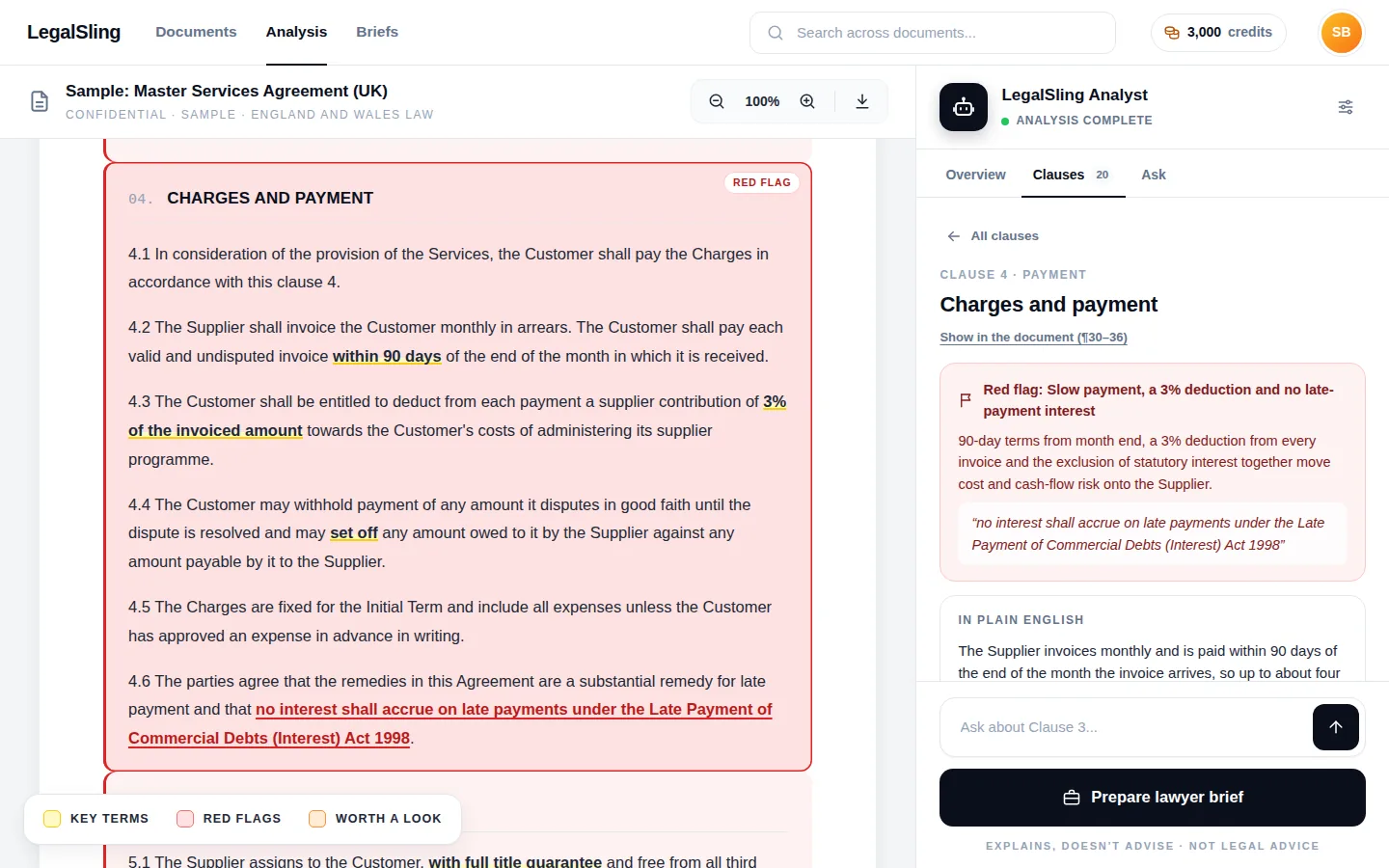
Payment up to four months after the work, less a 3% “supplier contribution”, with statutory late-payment interest excluded.
Contracts are written by the side with the lawyers
When a bigger company sends you its contract, its lawyers wrote it to protect it. You’re asked to sign quickly, and paying a lawyer to read every agreement soon adds up. LegalSling is AI contract review built for the smaller side of the deal: it gives you a clear, even-handed reading of what you’ve been sent.
See both sides
Every clause is explained in plain English, with what it means for you and for them, and which way it leans.
Spot what goes too far
Terms that are one-sided, unusual or may go further than the law allows are flagged, with the exact words highlighted.
Make your lawyer’s time count
Arrive with a brief: the red flags, your notes and the questions to ask, so the time you pay for goes on advice.
Every clause explained from both sides
Here’s a liability clause of the kind small suppliers are often sent, and how LegalSling reads it.
Clause 9 · Liability
9.1 The Supplier shall indemnify the Customer against all losses, costs, damages and expenses arising out of or in connection with the Services, howsoever arising.
9.2 The Customer’s total liability under this Agreement shall not exceed the Charges paid in the three months before the claim.
9.3 Nothing in this clause 9 limits the Supplier’s liability under clause 9.1.
In plain English
The Supplier promises to cover the Customer’s losses connected with the work, whatever caused them. The Customer’s own liability is capped at three months’ charges, but the Supplier’s promise has no cap at all.
Leans towards the Customer.
What it means for each side
Red flag: a one-way, uncapped indemnity
The indemnity covers losses “howsoever arising”, including ones the Supplier didn’t cause, and has no cap, while the Customer’s liability does. That imbalance is worth discussing before you sign.
A question for your lawyer: could the indemnity be limited to losses caused by our breach or negligence, and capped?
An example written for this page. In the app, the clause is highlighted in your own document and every point links to its paragraph.
What you get with every contract review
One upload gives you a full reading of the document, from the big picture down to single words.
The whole contract at a glance
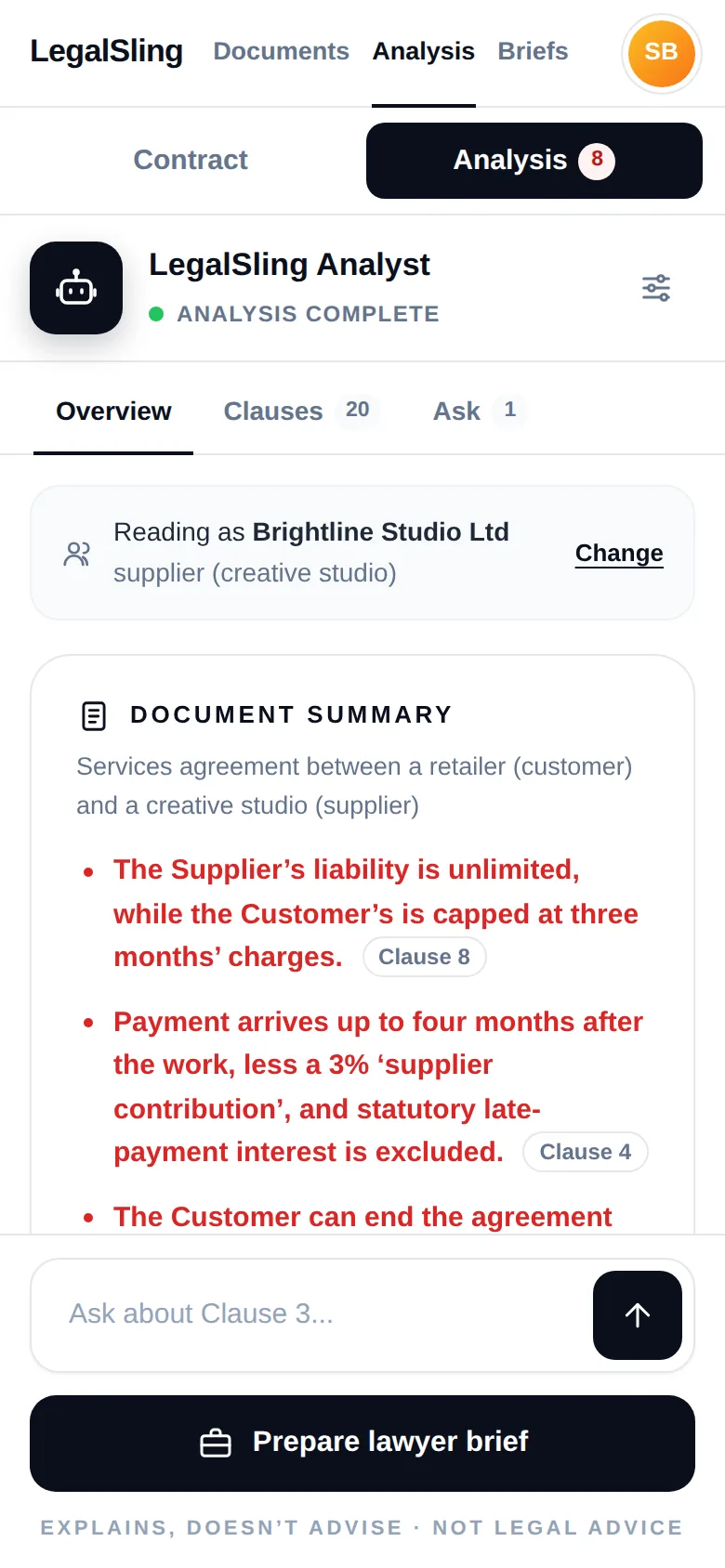
Start with a summary of the agreement: who the parties are, which law governs it, the key facts, and the red flags in order of importance, each linked to its clause.
- Key facts such as length, renewal, payment timing and notice periods
- What the contract doesn’t cover, and why it matters
- Missing schedules, blanks, tracked changes and hidden text
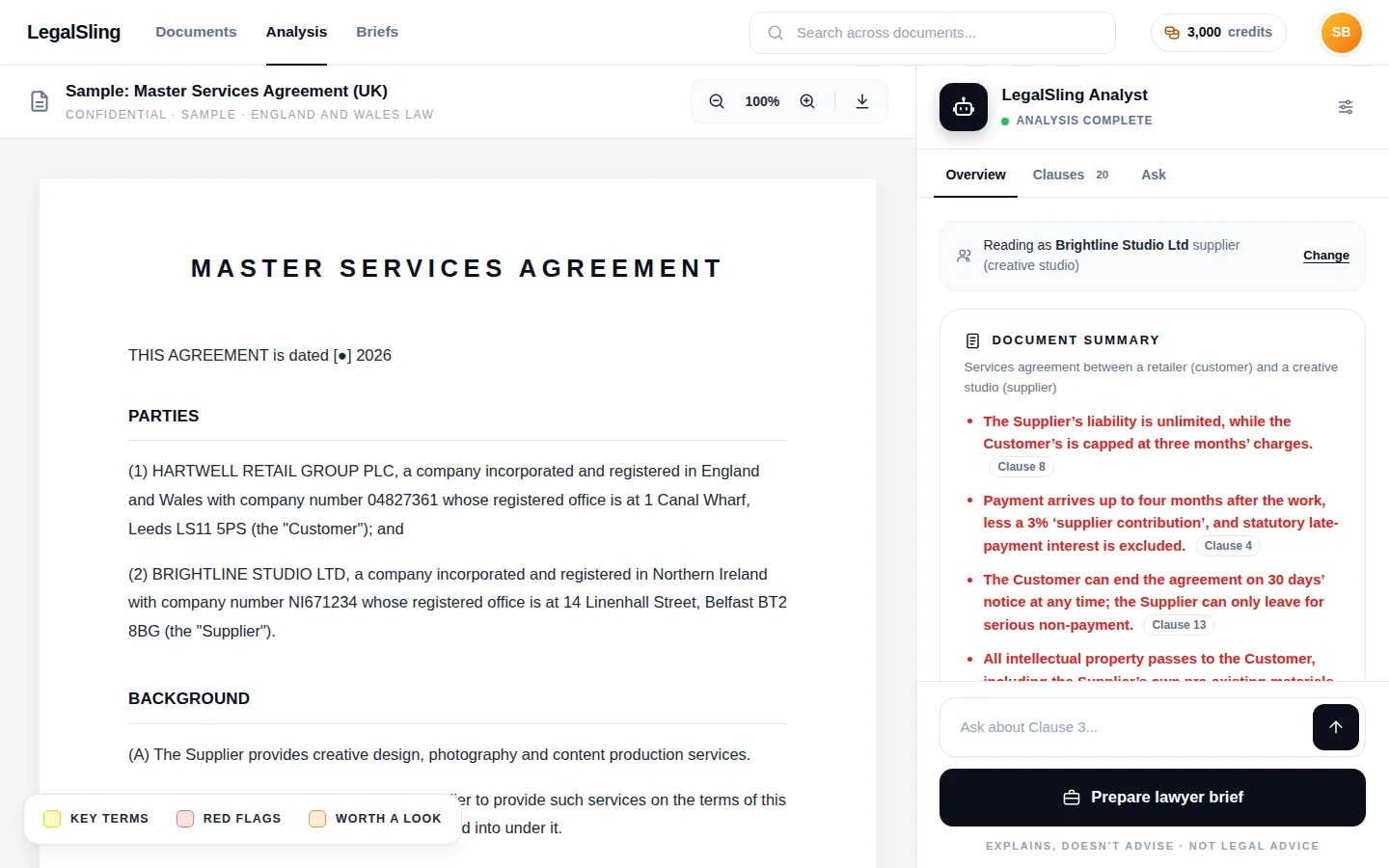
Red flags you can see in the document
Each clause gets a plain-English explanation, what it means for each side and which way it leans. Terms that are markedly one-sided, unusual for this kind of agreement, or that may go further than the law allows are flagged, with the words that matter highlighted.
- Red flags, plus “worth a look” for common terms that deserve a question
- Key terms explained where they appear
- Say which side you’re on to see what counts against you
Ask questions, get answers from the document
Ask anything about the contract, such as “Can they end this early?” or “Who owns the designs?”. Answers come only from the document, with links to the paragraphs they rely on.
- Every quote checked against the contract’s text
- Works on your phone as well as your computer
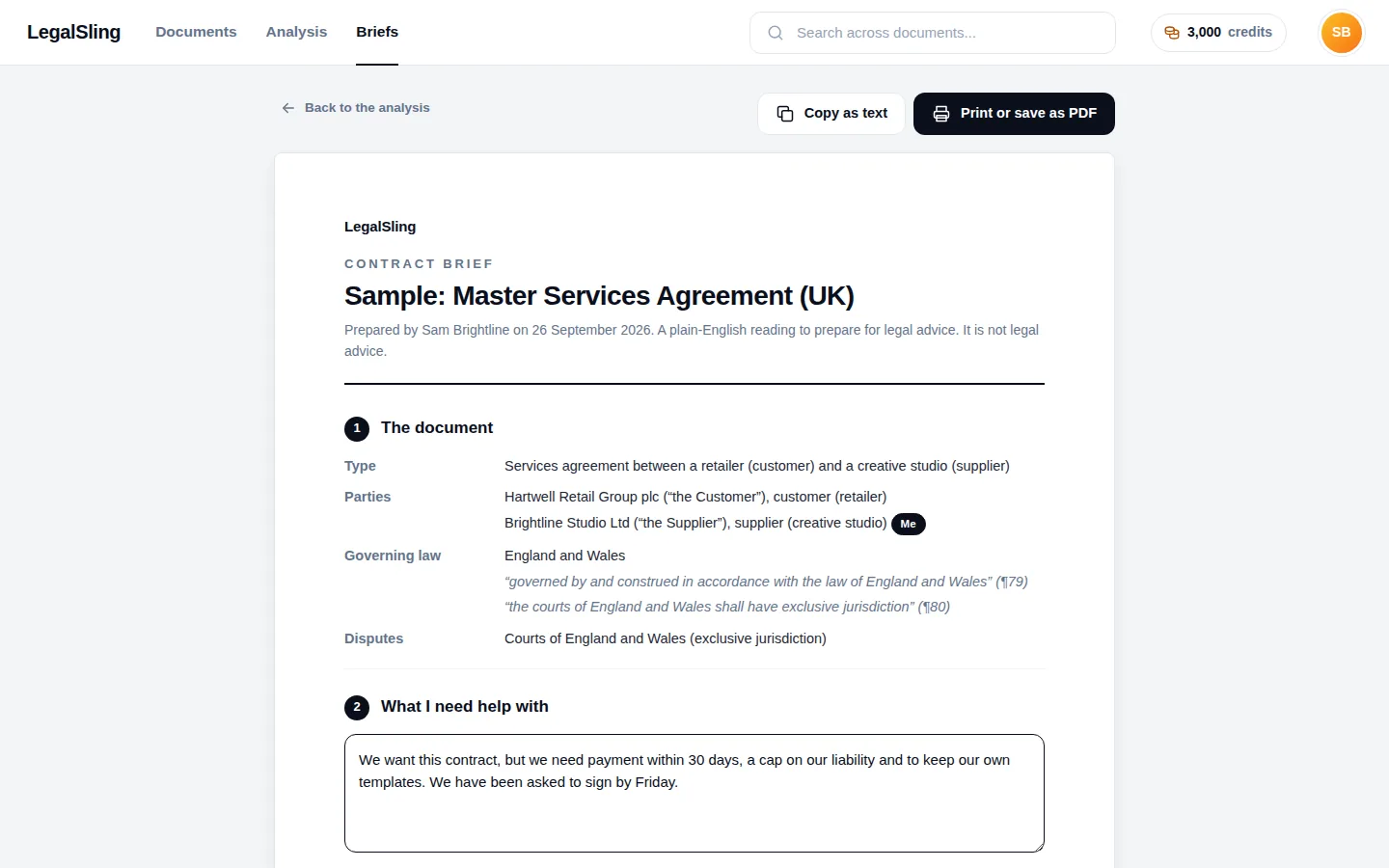
A brief your lawyer can work from
Add your own notes to any clause, then turn the red flags, your notes and the suggested questions into a brief. Print it, save it as a PDF or paste it into an email.
- What you need help with, in your own words
- Questions to ask, clause by clause
- The points worth checking and what the contract leaves out
UK, EU and US contracts
Governing law read from the contract, never guessed
What a clause means can depend on which law applies. LegalSling takes the governing law only from the contract’s own wording and shows you the exact words it relied on. If the contract doesn’t say, you’re told it’s not stated.
- England and Wales
- Scotland
- Northern Ireland
- EU member states
- US states
Contracts under other laws are still explained, with general context only.
“This Agreement shall be governed by and construed in accordance with the law of England and Wales.”
Quoted from clause 18.1
Governing law: England and Wales
No governing-law or jurisdiction clause.
Clues, such as where each party is registered, are listed as clues only.
Governing law: not stated
Built for the smaller side of the deal
For people who are sent contracts by bigger organisations and don’t have a lawyer on staff.
Our story
A contract means what it says, not what someone tells you it means
“Like a lot of small business owners, I’ve been through a contract dispute. Mine took more than a year to resolve. I had to figure out much of it for myself: where I actually stood, what my options were, and what was worth paying a lawyer for. It was expensive, exhausting, and one of the hardest periods for my business since I started it.”
David, founder of LegalSling
An explanation, not legal advice
LegalSling helps you understand a contract and prepare for a conversation with a lawyer. It doesn’t replace one.
What LegalSling does
- Explains what each clause says and how it works
- Shows what it means for each side, and which way it leans
- Flags terms that are one-sided, unusual or may go too far
- Suggests questions to ask your lawyer
What it doesn’t do
- Tell you whether to sign
- Tell you what to negotiate or what to do
- Give legal advice or act as your lawyer
- Promise it has caught everything
Pay only for what you use
No subscription. Start with 500 free credits when you sign up, then buy credits in packs from £50 when you need them. Credits never expire.
500 free credits
Enough for a 1-page contract, or about 7 questions. No card needed, and the sample contracts are always free.
About £19 for 10 pages
Each review costs what it takes to read and explain. You see an estimate before it starts and pay only for what it uses.
Packs from £50
One credit is 1p. Buy 5,000, 10,000, 25,000 or 50,000 credits at a time, by card through Stripe.
Guides to the clauses that matter
Plain-English guides to the terms small businesses are most often asked to accept, and the questions to ask about them.
Frequently asked questions
What is LegalSling?
LegalSling is an AI contract review tool for small businesses, freelancers and agencies. You upload a contract you’ve been sent and it explains every clause in plain English, shows what each one means for each side, flags terms that may go too far and prepares a brief for your lawyer. It explains contracts; it doesn’t give legal advice.
Can AI review a contract?
AI can read a contract, explain it in plain English and spot terms that are one-sided or unusual, quickly and at low cost. It can also misread context or miss something, so treat it as a careful first reading. LegalSling checks every quote it shows against your document and says “not stated” rather than guessing, but for anything important, use the analysis to brief a qualified lawyer.
Does LegalSling replace a lawyer?
No. LegalSling explains what a contract says and flags points to discuss, but it doesn’t tell you whether to sign or what to negotiate, and it isn’t a law firm. It helps you work out which points need a lawyer’s advice, and makes that advice quicker to get: you can send your lawyer a brief with the red flags, your notes and the questions to ask.
Which contracts can it review?
Business contracts you’ve been sent, such as services agreements, statements of work, consultancy and agency agreements, supply agreements, NDAs and terms and conditions. Upload a PDF (scanned PDFs work too), a Word document or plain text, up to 20 MB. It’s built for contracts governed by UK, EU or US law, and explains others with general context only.
Does it work for UK, EU and US contracts?
Yes. It’s built for contracts governed by the law of England and Wales, Scotland, Northern Ireland, EU member states and US states. LegalSling reads the governing law from the contract itself and shows you the words it relied on. If the contract doesn’t say which law applies, it tells you so rather than guessing.
Is my contract kept private?
Yes. Your documents are visible only to your account, stored encrypted and used only to produce your review. To create the analysis, the text is processed by Anthropic’s Claude AI. You can delete any document, or your whole account, at any time. Read how we handle your documents.
How much does it cost?
You start with 500 free credits as soon as you sign up, with no card needed. After that you buy credits in packs from £50, with no subscription, and they never expire. A 10-page contract uses about 1,900 credits (around £19) and a question about 64 credits (64p). See pricing.
Know what you’re signing
Upload a contract and get a plain-English review with red flags and a brief for your lawyer. 500 free credits to start, no card needed.